Overview
This article provides information related to the different statuses that are defined for CloudFix recommendations and their workflow.
<supportagent> The status of each recommendation can be seen from the UI and from the RDS Database.</supportagent>
Information
<supportagent>
For each of the recommendations for a Tenant, the recommendations' current status can be tracked from the status column of the recommendation table in the pcfx_cloudfix_prod database.
</supportagent>
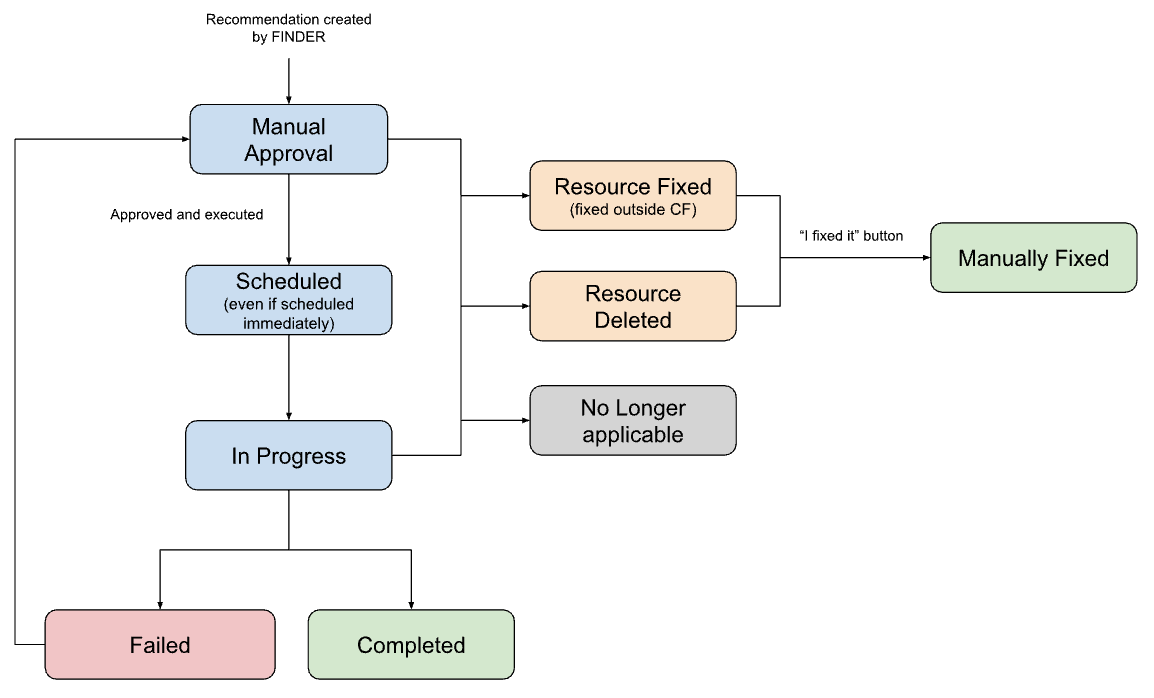
More information about each status:
Manual Approval- Recommendation is waiting for the user to trigger the execution (the template might be pending approval or already approved).Scheduled- To be executed in the future, it can also be seen for a short time when scheduled to execute immediately.In Progress- Runbook is being executed in real-time.Completed- Resource that is fixed by CloudFix.Failed- Fixer doesn't proceed to completion due to any reason.No Longer Applicable- The recommendation is not valid anymore.Resource Deleted- The resource is not available anymore in the account.Resource Fixed- CloudFix notices the resource was fixed outside CloudFix.Manually Fixed- When the platform detects that a resource was fixed outside CloudFix. Runs weekly.
<supportagent>
Do not confuse the status of the recommendation with the status of the change request. This second can be tracked under from the change_request_status column of the recommendation table in the pcfx_cloudfix_prod database. The underlying values in that column come from the AWS SSM Automation execution (or, for older change requests, the OpsItem) and map onto the recommendation statuses above as follows:
Waiting,Pending,PendingApproval,PendingChangeCalendarOverride,Approved,ChangeCalendarOverrideApproved,Scheduled, or (legacy OpsItem)Open→ recommendation statusScheduledInProgress,RunbookInProgress→In ProgressSuccess,CompletedWithSuccess, or (legacy OpsItem)Resolved→CompletedTimedOut,Failed,CompletedWithFailure→FailedRejected,ChangeCalendarOverrideRejected→RejectedCancelling,Cancelled, or (legacy OpsItem)Closed→No Longer Applicable
</supportagent>
Priyanka Bhotika
Comments